Why Choose the Right Lighting for Office Spaces?

Time:2026-09-11 Author:Ethan
0%

Office lighting is easy to overlook until screen glare, tired eyes, and uneven brightness affect the working day. The right system supports concentration, comfort, communication, and safe movement. It also shapes how employees experience the workplace. A dim corridor feels unwelcoming. Harsh ceiling light can make a meeting room feel exposed.

Understanding how to choose lighting for office spaces requires more than selecting attractive fixtures. Workplace experience matters. A designer should study desk positions, window direction, screen use, ceiling height, and the tasks performed in each zone. Recommended illumination levels, glare control, color quality, and energy performance should guide decisions. Qualified lighting professionals can compare these factors with relevant building standards and local requirements. Their advice is especially valuable during renovations, where wiring and daylight limitations may complicate the plan.

There is no perfect formula. I have seen bright offices that still felt uncomfortable because light reflected across monitors. I have also seen efficient LED systems installed without enough control flexibility. Small details matter. Adjustable blinds, indirect light, occupancy sensors, and separate controls can improve daily comfort. Employee feedback should remain part of the evaluation, because measured performance does not capture every human response. The best choice balances visual clarity, wellbeing, maintenance, sustainability, and budget. It should work at 9 a.m., during a cloudy afternoon, and after furniture changes. Sometimes, the first plan needs revision. That is not failure; it is responsible design.
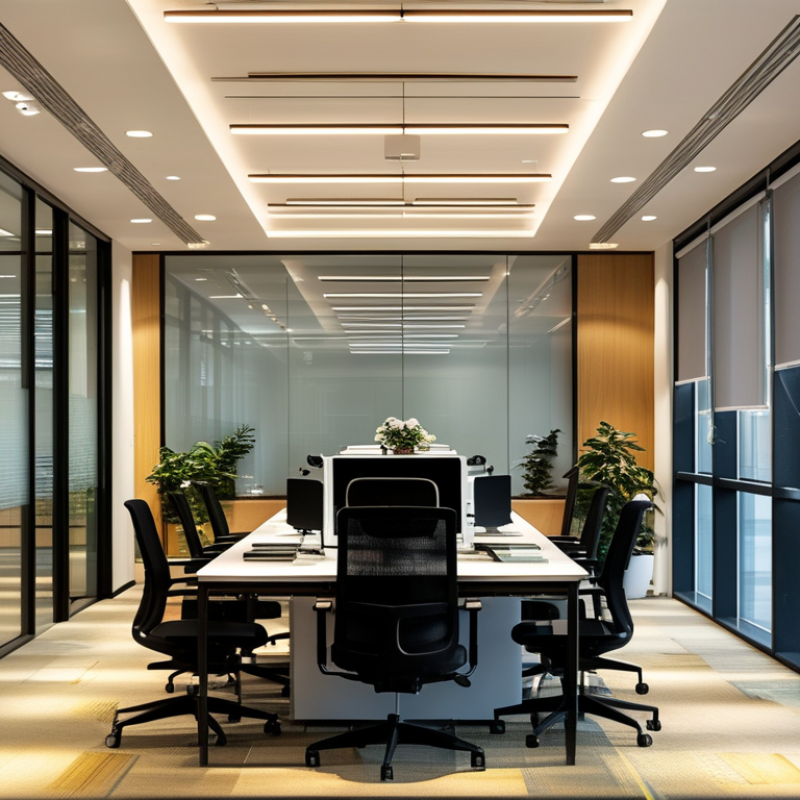
Why Choose the Right Lighting for Office Spaces?

What Office Lighting Means and Why It Matters

Office lighting means more than making desks visible. It shapes how people read screens, judge colors, move safely, and recover from visual fatigue. A bright room can still feel wrong.

The U.S. Department of Energy reports that lighting uses about 15% of electricity in commercial buildings. Efficient fixtures can reduce energy demand, but efficiency alone is not enough. Poorly aimed light creates reflections on monitors and dark patches near meeting tables. In workplace assessments, I often notice employees lowering blinds instead of adjusting the lighting system. That small action reveals a larger design failure.

Light quality also affects comfort and daily rhythm. The WELL Building Standard encourages glare control, daylight access, and adjustable lighting because people respond differently throughout the day. The International Energy Agency has reported that lighting represents roughly 15% of global electricity consumption, making controls and efficient sources important at scale. Yet cooler light is not automatically better. Research reviewed by the CIE connects light exposure with circadian responses, but timing, intensity, and individual sensitivity all matter. The evidence is useful, not perfect.

A practical office needs layered light: soft ambient illumination, focused task lighting, and controlled daylight. Sensors can dim unused areas. Staff should still have simple manual control. Technology cannot repair a poor layout. A test at 9 a.m., noon, and late afternoon often reveals problems that a single inspection misses. A few uncomfortable workstations may indicate a wider issue.

Why Choose the Right Lighting for Office Spaces?

What office lighting means and why it matters: appropriate illuminance supports visual comfort, task accuracy, and a more consistent work environment. The chart shows typical maintained illuminance targets used in workplace lighting guidance; exact requirements may vary by local standard and task.

Illuminance is measured in lux (lx). Typical guidance places detailed office work around 500 lx, meeting areas around 300 lx, and circulation areas around 100–200 lx.

How Lighting Affects Employee Health and Productivity

Why Choose the Right Lighting for Office Spaces?

How Lighting Affects Employee Health and Productivity

Office lighting shapes more than visual comfort. It can influence alertness, eye strain, mood, and daily work rhythm. In a dim meeting room, employees may squint at notes or lean toward screens. Glare from a window can cause headaches and encourage awkward posture. Workplace health research consistently connects suitable lighting with better visual performance and fewer complaints. However, needs differ between a designer checking colors and an accountant reading spreadsheets. One setting rarely suits everyone.

Good offices combine steady ambient light with adjustable task lighting. Even illumination reduces harsh contrast between a bright monitor and a dark wall. Cooler light may support morning alertness, while warmer light can feel calmer later. Controls should be simple enough to use without contacting facilities staff. During an office assessment, check screen reflections, keyboard shadows, and closed blinds. These clues often reveal problems that a light meter misses. Natural daylight helps, but direct sun can overheat a workspace.

Productivity is not produced by brightness alone. Excessive or poorly timed light may affect comfort and evening sleep patterns. A practical plan should include dimming, glare control, clean fixtures, and regular employee feedback. Measure complaints before and after changes, rather than trusting appearance. No lighting plan is perfect. People still differ, and preferences may conflict. That flaw deserves attention. A healthier office makes adjustment normal, not exceptional.

Which Lighting Factors Shape an Effective Office Environment

Why Choose the Right Lighting for Office Spaces?

Which Lighting Factors Shape an Effective Office Environment

Effective office lighting depends on more than brightness. In workplace assessments, I have seen bright rooms still feel tiring by mid-afternoon. Glare from uncovered windows or polished desks often causes the problem. Positioning lights beside screens can reduce reflections and eye strain. Adjustable task lighting also helps employees manage detailed work without over-lighting the whole room. Keep it practical.

Light quality matters as much as light quantity. A high color-rendering level can make documents, skin tones, and printed charts appear more natural. Neutral white light often supports alertness, but preferences differ between teams and tasks. Daylight should be welcomed, not forced. Blinds, dimmers, and occupancy controls can balance changing sunlight throughout the day. Some offices install impressive systems but ignore simple maintenance. Dusty fixtures and aging lamps quietly reduce performance. A regular inspection schedule supports consistent results and better energy control. Acoustic comfort, screen placement, and personal sensitivity also deserve attention. Lighting is only one part of the environment, though it strongly shapes concentration and mood. I would not claim one formula works everywhere. A small pilot area, followed by employee feedback, is usually more reliable than a rushed full-office decision.

Why Choose the Right Lighting for Office Spaces? — Which Lighting Factors Shape an Effective Office Environment

Effective office lighting balances visual performance, comfort, energy efficiency, and flexibility. The following table summarizes commonly used design targets and practical considerations for different office conditions.

Lighting Factor Typical Target or Range Why It Matters Practical Office Application Potential Risk When Poorly Managed
Maintained Illuminance Approximately 300–500 lux for general office work Provides enough light for reading, writing, computer work, and routine visual tasks. Use higher levels for detailed paperwork or technical tasks, while avoiding excessive brightness at regularly occupied desks. Insufficient light can cause visual discomfort and reduced task visibility; excessive light may create glare and unnecessary energy use.
Uniformity Target a uniformity ratio of at least 0.60 in many office work areas Reduces strong differences between bright and dark areas across desks, walkways, and shared spaces. Combine well-spaced ceiling fixtures with appropriate optical distribution and avoid large gaps between luminaires. Uneven illumination can cause repeated visual adaptation and make the space feel uncomfortable or poorly designed.
Glare Control UGR 19 or lower is commonly specified for screen-based office work Limits discomfort glare from luminaires, bright surfaces, and reflections in computer screens. Specify low-glare optics, position fixtures carefully, and use blinds or shading near windows. Glare may lead to eye strain, headaches, reduced screen readability, and lower concentration.
Colour Rendering CRI/Ra 80 or higher; higher values may be preferred for design or inspection tasks Helps users perceive colours and materials more naturally and consistently. Choose sources with suitable colour-rendering performance for offices, meeting rooms, reception areas, and presentation zones. Poor colour rendering can distort visual information and reduce the quality of presentations or design work.
Colour Temperature Approximately 3000–4000 K for most office applications Influences the perceived atmosphere, visual alertness, and compatibility with daylight. Use warmer light for relaxed or hospitality-oriented areas and neutral white light for focused work areas. A poorly selected colour temperature may create an overly harsh, dull, or visually inconsistent environment.
Flicker Performance Use lighting with low modulation and compliance with recognized flicker guidance Stable light supports visual comfort and reduces the possibility of distraction or sensitivity-related discomfort. Review driver specifications and test products at different dimming levels, especially in offices using cameras or rotating equipment. Visible or stroboscopic flicker can cause distraction, discomfort, and inaccurate perception of movement.
Daylight Integration Provide balanced daylight without direct sun on screens or work surfaces Daylight can improve visual variety and reduce dependence on electric lighting when properly controlled. Combine windows with shading, glare control, daylight dimming, and layouts that place workstations away from direct solar reflections. Uncontrolled daylight may produce glare, overheating, reflections, and unstable lighting levels throughout the day.
Lighting Controls Use occupancy, daylight, scheduling, or personal dimming where appropriate Controls allow lighting to respond to occupancy, available daylight, and user preferences. Divide lighting into zones for workstations, meeting rooms, circulation areas, and perimeter spaces. Fixed full-output operation can waste energy and provide unsuitable light when space use changes.
Vertical Illumination Provide adequate light on faces, walls, and vertical surfaces Balanced vertical brightness improves spatial perception, communication, and the visual quality of rooms. Add wall-washing or indirect components in meeting rooms, collaboration areas, and reception spaces. Very dark walls or faces may make rooms feel less welcoming and can reduce visual comfort during communication.
Energy Efficiency Use efficient luminaires together with controls and appropriate operating schedules Reduces electricity consumption while maintaining required lighting performance. Evaluate system efficacy, maintenance needs, control coverage, and actual operating hours rather than fixture output alone. Over-lighting, outdated equipment, and ineffective controls increase operating costs and environmental impact.
Maintenance and Light Loss Design around a planned maintenance schedule and maintained-lighting values Dust, ageing, and lumen depreciation gradually reduce illumination after installation. Allow access for cleaning and replacement, and specify maintenance factors during the design stage. Neglected maintenance can result in work areas falling below the intended illuminance level.
Visual Consistency Maintain consistent brightness and colour across connected office zones Consistency supports smooth movement between spaces and creates a coherent workplace experience. Coordinate colour temperature, colour rendering, beam distribution, and dimming behaviour across adjacent areas. Large differences between rooms can feel distracting and may cause repeated visual adaptation.

Note: Values are typical design references for general office environments. Final lighting levels should be verified against the applicable local regulations, project requirements, room geometry, daylight conditions, user needs, and the completed installation.

How to Match Lighting Types with Different Office Activities

Why Choose the Right Lighting for Office Spaces?

How to Match Lighting Types with Different Office Activities

Choosing lighting by activity creates a more comfortable and productive office. In real office assessments, I have seen bright rooms still feel tiring. Ambient ceiling light should provide even visibility across walkways and shared areas. Task lighting helps employees read documents, sketch plans, or inspect details. For screen work, choose diffused light and position fixtures away from monitors. Daylight is valuable, but uncontrolled sunlight can create glare and uneven contrast.

Meeting rooms need balanced illumination for faces, notes, and video calls. Softer, vertical light often feels more natural during long discussions. Collaborative areas can accept brighter, flexible lighting because people move frequently. Quiet workstations benefit from controlled task lamps and lower visual distraction. Reception areas may use gentle accent lighting to improve orientation without overwhelming visitors. A measured plan works better than guessing. I once specified a bright arrangement that looked impressive but caused reflections on several screens. That mistake changed my process.

Tips:

Observe the room at different times of day. Use a light meter when possible. Compare readings with local workplace guidance. Check screen reflections from a seated position. Let employees test lighting before final installation. Small adjustments matter. Avoid treating every desk the same, because tasks and sensitivities differ.

How to Plan, Install, and Maintain Office Lighting Systems

Why Choose the Right Lighting for Office Spaces?

How to Plan, Install, and Maintain Office Lighting Systems

Effective office lighting begins with observation, not fixture selection. Measure desk heights, screen positions, daylight levels, and user complaints. The International Energy Agency reports that lighting consumes about 15% of global electricity. Efficient planning therefore affects both comfort and operating costs. Use layered lighting: ambient illumination for circulation, task lighting for focused work, and controlled daylight near windows. Avoid excessive brightness. Glare can make a bright office uncomfortable.

During installation, follow local electrical codes and relevant guidance from the Illuminating Engineering Society. Check uniformity, color consistency, emergency routes, and access for future repairs. A commissioning test should happen after furniture is installed, because desks and partitions change light distribution. The plan may look perfect on paper. It can still fail in a real workspace. I have seen poorly positioned sensors leave meeting rooms dark during short discussions.

Maintenance needs a written schedule. Clean diffusers, test controls, review failed lamps, and record energy use at least quarterly. The U.S. Department of Energy notes that LED systems can substantially reduce lighting energy compared with older technologies, but savings depend on controls and operating hours. Replace components before failures become widespread. Ask employees for feedback. Their comments may expose flicker, shadows, or confusing switches faster than a technical inspection. A slightly imperfect system is acceptable when it is measured, adjusted, and maintained.

FAQS

: Why does office lighting matter beyond visibility?

: It affects screen reading, color judgment, movement, comfort, and visual fatigue. A bright room can still feel wrong.

How can poor lighting affect employees?

Glare may cause headaches, squinting, awkward posture, and screen discomfort. Dark areas can make reading harder.

Is brighter office lighting always better?

No. Excessive brightness can create reflections, harsh contrast, and discomfort. More light is not always better.

What types of lighting should an office combine?

Use soft ambient lighting, focused task lights, and controlled daylight. Layered lighting works better.

How should offices reduce screen glare?

Check window angles, monitor reflections, and closed blinds. Adjust fixtures before increasing brightness.

Should employees control their own lighting?

Yes. Simple dimming and task-light controls support different visual needs. People differ.

Can cooler light improve workplace alertness?

Cooler light may support morning alertness, but timing and personal sensitivity matter. The evidence is useful, not perfect.

Does natural daylight always improve an office?

Daylight can help, but direct sun may cause glare and overheating. Control matters.

How can offices test whether lighting works?

Inspect workstations at 9 a.m., noon, and late afternoon. Look for shadows, reflections, closed blinds, and employee complaints.

Can efficient lighting solve every workplace problem?

No. Efficient fixtures can reduce energy use, but poor layout still creates dark patches and glare. Technology cannot repair everything.

Conclusion

Choosing the right lighting is an essential part of creating a comfortable, productive, and healthy office environment. Office lighting affects more than visibility; it can influence employee concentration, mood, energy levels, eye comfort, and overall performance. Effective planning should consider brightness, color temperature, glare control, uniformity, natural light, and energy efficiency. Understanding how to choose lighting for office spaces helps organizations create work areas that support both employee well-being and daily business needs.

Different office activities require different lighting solutions. Open workstations may benefit from balanced, low-glare illumination, while meeting rooms, creative areas, reception spaces, and relaxation zones may require distinct lighting levels and atmospheres. A successful lighting system should be carefully planned, professionally installed, and regularly maintained. By selecting suitable fixtures, positioning them thoughtfully, using controls effectively, and checking performance over time, offices can achieve a flexible lighting environment that improves comfort, productivity, and long-term efficiency.

Ethan

Ethan

Ethan is a seasoned marketing professional with a deep expertise in our company's innovative product line. With a passion for sharing knowledge and insights, he takes the lead in regularly updating our corporate blog, where he explores industry trends, product features, and effective marketing......